
i-Store PRO
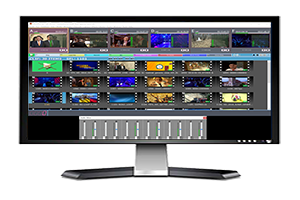
Cost-effective, still and clip store, easy to operate multi-channel playout device, iStore Pro is crazy fast, designed for unforgiving environments such as live control rooms, remote production trucks, news studios, where manual operation should happen fast and precise.

- Description
Fast Integrated Still and Clip Manual Playout System
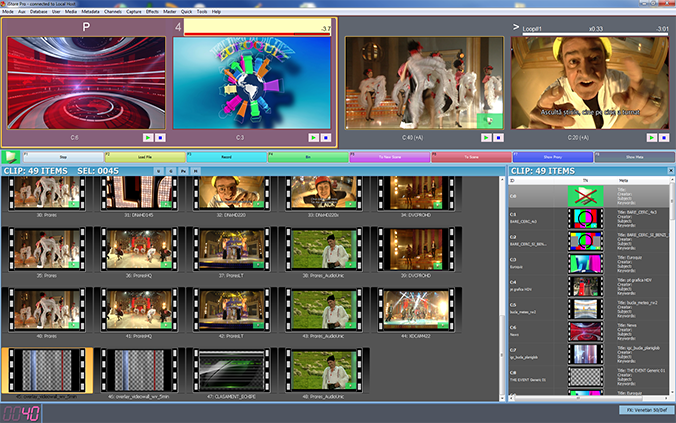
i‑Store PRO is a real-time broadcast manual play-out device, able to display — with no rendering required — professional file formats such as XDCAM HD 420/422, Apple ProRes, Avid DNxHD, DVC PRO HD, MJPEG, MPEG‑2, MXF and MOV. This allows direct playback of a wide range of production-ready files, easing workflow and reducing operational costs by removing unnecessary transcoding steps.
Unlike many automated playout systems, i‑Store PRO is specifically fine-tuned for manual operation.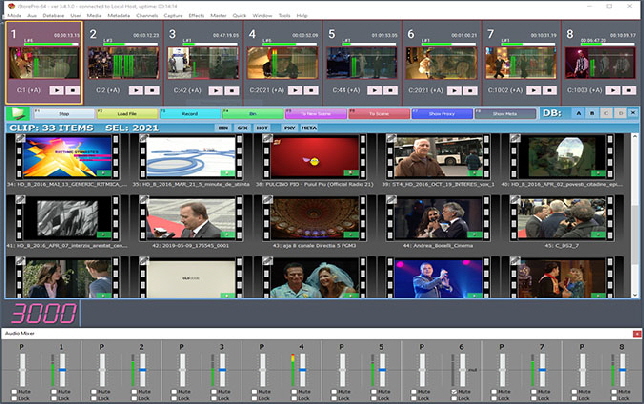 It is fast, intuitive, and precise — making it especially useful in live production environments where immediate control and responsiveness are critical. Its design minimizes operator errors and speeds up decision-making, helping teams work more efficiently under time pressure.
Features include:-
Intuitive graphical user interface for quick learning and speed in daily operation
-
Single-action keyboard commands for instant playout from master control
-
GPI control for integration into existing studio and broadcast automation systems
-
Single or up to 8‑channel playout without the need for re‑encoding or transcoding
-
Database management of all clip and still assets with advanced metadata lookup tools
-
Concurrent access with cross-notifications of changes between multiple users, ensuring all operators see updates in real time
-
Direct recording of graphics and video/audio in uncompressed YUV 4:2:2 or M‑JPEG formats — ready for immediate use
-
Automatic display aspect ratio correction for formats such as HD XDCAM
-
High‑quality on‑the‑fly scaling and video processing applied during playback
-
Real-time field dominance correction during playback to fix incorrectly ingested or imported clips
i‑Store PRO is designed to integrate smoothly into existing broadcast workflows, whether in news production, live event coverage, sports arenas, or master control rooms. With versatile format support, low latency playback, and an operator-friendly interface, it delivers dependable performance in environments that demand both speed and precision.
iStore PRO Applications:-
Live Control Rooms
-
News Studios
-
Remote Production Trucks
-
Multimedia Archive Centers
-
- Read the full story
Video & Graphics Playout for all broadcast & consumer formats
Read the full story- Multi-format playout
Playback solution for video/audio/graphics files
 :
:- Apple ProRes
- Avid DNxHD
- XDCAM HD 420/422
- DVCPRO HD 100Mb/s
- AVC-Intra -50 and 100 Mb/s
- MJPEG
- MPEG2
- MP4
- MKV
- AVI
- MOV
- TGA
- PNG
- JPG
Video and graphics databases operate independently, ensuring flexible asset management.
Graphics files are designed for use as either full-screen still-store visuals or as overlay elements such as watermarks.
- Multi-channel Operation
 Single or multi-channel operation (subject to licensing, multichannel from two channel up to 32 channels – hardware should be powerful enough to handle massive data); the standard license includes operation for 2 Channels. Additional channels are optional.
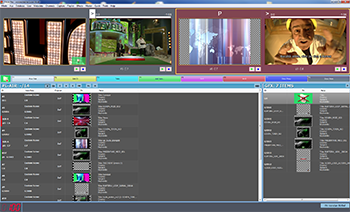 Multichannel playlist or single -, per channel, playlist (multichannel playlist is one per system; each item specifies to which target channels to play; in single channel playlist mode, for each channel there is one independent playlist; target is locked to this channel).
- Automation Integration and 32bpp video path
GPI control via GPI server (the software layer can run in the same system with the iStore PRO server, sharing the motherboard’s PCI Express slots with the Blackmagic video boards, or can run from an independent computer, allowing more GPI boards)
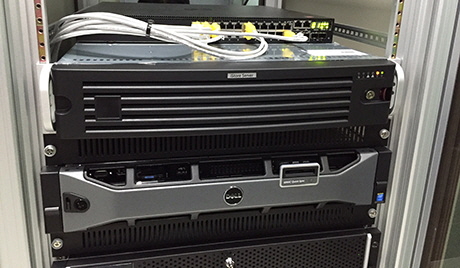
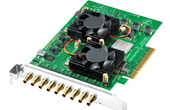
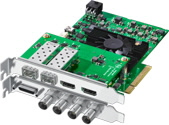
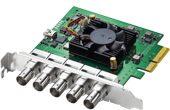
Playback of all graphics and clips is performed by using Black Magic™ - Decklink cards. Depending on the HW platform, a 10 bit linear, internal, downstream Keyer, or Video and Key outputs are provided for direct feed to the switcher.
- On-the-fly resolution & Aspect Ratio convertion and Manual/Automatic Import
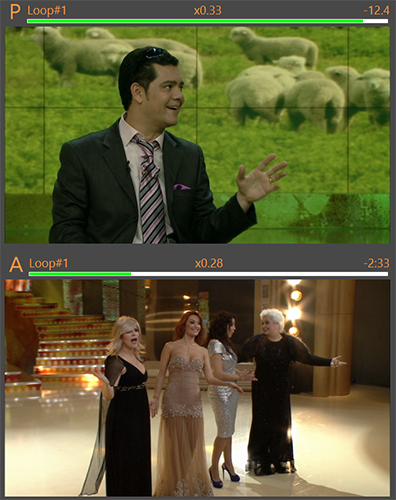 Automatic Display Aspect Ratio correction for formats such as HD XDCAM or anamorfic non-square pixel format (e.g. graphics for custom LED walls
- High quality scaling for clips (video processing is applied on-the-fly during playback)
- On-the-fly correction, during playback (to correct the wrong field dominance of an ingested/imported clip)
- Search engine with logical operators or simple “google-like” syntax
- Multiple Watch Folders (aka ingest folders) with independent settings for handling ID (auto numbering or overwrite), database registering and secondary file handling
- Superior database engine with fast refresh (5 times faster refresh, on average, via multi-threaded network file access)
- Adjustable playback speed (0.8 to 1.5 with pitch preservation)
- Audio level correction (-/+ 30dB)
- Real time audio level adjustment
- .bridge - Non-Linear Editor Integration
.bridge: Search, Media Preview and Export Tool for IStore Server solution
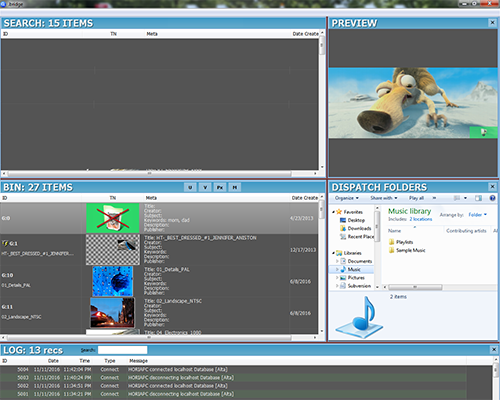
.bridge is an organizational tool, implementing the link between iStore Server solution and a NLE system.
- Configures a set of IStore Database Connections similar to those presented in IStore Pro.
- Configures a set of custom Dispatch Folders. These are destination folders corresponding to drop folders in NLE.
- Defines a Search Viewport. Allows the user to search media (clips only) content in one or multiple database connections and returns the search result in the Search Viewport. Search tools are similar to those in IStore Pro,and includes the Source File Name search. Allows further search operations to add or restrict the current result set from the previous search (unions and intersections).
- Defines a Bin Viewport. Allows the user to retain session-persistent set of media objects in a Bin Viewport. Selection of media objects from Search Viewport can be added to Bin via drag & drop and menu commands. Objects can be removed from Bin without affecting the IStore databases.
- Allows Favorites Marks to be persistently applied to selection of objects in Bin Viewport.
- Hardware Requirements
Our software products are fully compatible with Blackmagic Design's capture and playback cards, including the DeckLink series. This ensures seamless integration in professional video environments and access to high-quality standards in broadcast and post-production
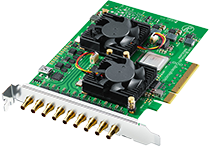 workflows
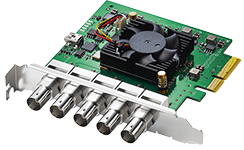
Supported Blackmagic Design Cards- DeckLink Series (PCIe)
- DeckLink Quad 2
- Decklink Duo 2
- DeckLink 8K Pro G2
- DeckLink Mini Monitor 4K (no KEY signal)
- Older Decklink boards with drivers starting from 10.xx
All DeckLink PCI Express (PCIe) cards work in Windows-based workstations and servers, offering excellent flexibility for deployment.
Compatible Operating Systems
Windows: Windows 7, Windows 8, Windows 10, Windows 11
Compatible Video and Audio Standards- SD, HD, Ultra HD, 4K video formats
- SDI, HDMI, Analog Component, S-Video, Composite connections
- 16 channels of audio input/output
- Blackburst sync input, tri-sync HD input
Connectivity Highlights
- SDI and HDMI outputs for monitors, broadcast decks, projectors, and video equipment.
- Support for older video devices via component analog, S-Video, and composite connections (various DeckLink models)
- Versatile PCIe slot compatibility: Compatible with both 8- and 16-lane PCIe slots, ensuring installation in most modern workstations
In summary:
Using Blackmagic Design DeckLink cards, our software will work on Windows systems and integrate smoothly with leading video, audio, visual effects, and streaming workflows. Both professional and consumer-grade equipment connections are supported, and developer resources are available for custom solutions.
- Multi-format playout
- What to buy
Product
Notes
IStore™ PRO Online BASIC 2 CH - cannot add options
Real Time Video and Graphics Playout software; HASP Dongle is included
IStore™ PRO Online - 4 Channels
Real Time Video and Graphics Playout software; HASP Dongle is included
IStore™ PRO Online - 8 Channels
Real Time Video and Graphics Playout software; HASP Dongle is included
IStore™ PRO Online - 12 Channels
Real Time Video and Graphics Playout software; HASP Dongle is included
IStore™ PRO Online - 16 Channels
Real Time Video and Graphics Playout software; HASP Dongle is included
IStore™ Offline
IStore™ Offline - 5pack
Options
IStore™ PRO - each additional Channel
IStore™ PRO - SDI Superimposed output
allow to enable superimposed TC over an SDI output for preview purposes (an SDI output should be available to enable the option on it) - requires the Superout option to be enabled
IStore™ PRO - Enable NDI Output
Enables iStore PRO to display in NDI output channels
IStore™ PRO Preview Option
hardware preview as static image in BMD Minimonitor (preview channel is not counted as a video channel)
IStore™ PRO Intelligent Interface Option
Allows automation control
IStore™ PRO MOM Option
Allows external metadata controller interface
IStore™ PRO Superout Option
Enables Superout display for Director monitor display with multichannel TC superimposed output on VGA/DVI/HDMI port
Command Dispatcher
Command Dispatcher application behaves like an Intelligent Interface Server (Chyron CII and LM-CII superset) receiving CII commands and dispatch them to two Logomaster or iStore servers; HASP Dongle for protection is required
GPI Server
Server software able to drive up to 4 GPI Interfaces (16x16) and send GPI commands to GPI enabled Logomaster/Grafster/Replay/Magic Mirror machines over TCP/IP network
GPI Interface
"GPI card, 16x16 with 0.5m cable and screw terminal box"
HASP Dongle
USB Dongle for software protection and options enabler
BUY or RENT

READY TO TALK ABOUT YOUR NEXT PROJECT?

CONTACT US
sales@convergetech.com
billing@convergetech.com
support@convergetech.com

CLICK HERE TO SEND EMAIL

If you would like to contact us with questions about our products or their integration in your applications, please send an email any time to our Customer Support Team, or call us Monday to Friday, between 9:00 am to 8:00 pm EST, at +1-516-236 7733, or between 9:00 to 7:00 pm GMT+2, at +407-223-68044
Sales
Billing
Support